The Pulse Sensor (SEN-11574) is a plug-and-play optical heart rate sensor that detects the pulse of blood flow through living tissue by shining a green LED onto the skin and measuring the reflected light with a photodiode.
As the heart beats, blood volume in the capillaries changes rhythmically, causing the intensity of reflected light to fluctuate. An onboard amplifier and noise cancellation circuit conditions this signal into a clean analog voltage output that any microcontroller ADC can sample to calculate heart rate in beats per minute.
Pinout
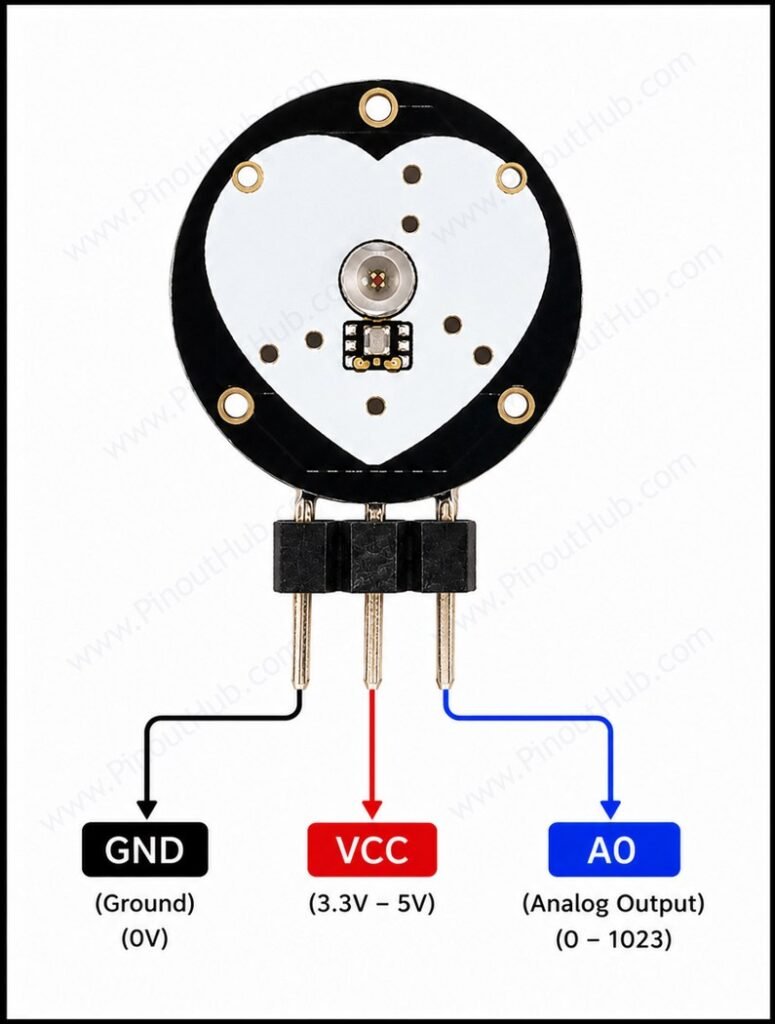
The Pulse Sensor connects via a 24-inch (610mm) cable with three color-coded wires terminated in a 3-pin connector or bare wire ends depending on the variant. There are no additional configuration pins — the sensor is always-on when powered.
| Wire Color | Name | Type | Description |
|---|---|---|---|
| Red | VCC | Power | Supply voltage — connect to 3.3V or 5V DC |
| Black | GND | Power | Ground |
| Blue | SIG | Output | Analog signal output |
ADC pin requirement: The SIG output is an analog voltage and must be connected to an analog input (ADC) pin on the microcontroller — not a digital input. On the Arduino Uno, any of the A0–A5 pins is suitable. On the Raspberry Pi, an external ADC such as the MCP3008 is required as the Raspberry Pi has no onboard ADC.
Sampling rate: The signal should be sampled at a minimum of 500 samples per second (every 2ms) for reliable peak detection across the full 24–240 BPM range. The PulseSensor Playground library for Arduino uses a 500Hz Timer1 interrupt by default for this purpose.
Module construction
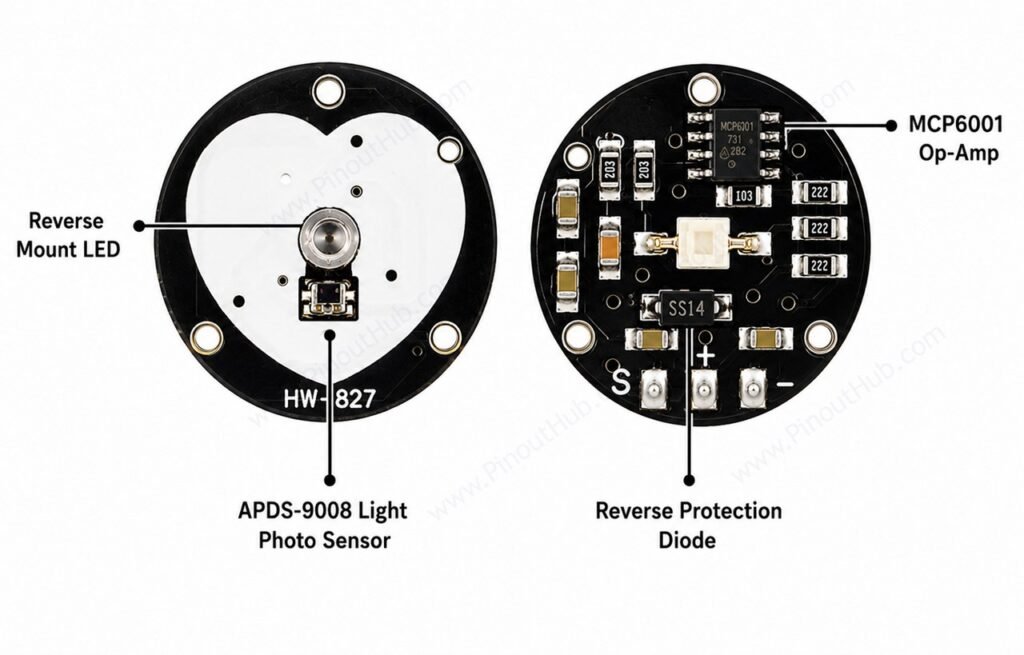
APDS-9008 Ambient Light Sensor IC A surface-mount IC integrating a photodiode and a transimpedance amplifier in a single package. Sensitive to the visible spectrum (particularly green), it converts the reflected green light intensity from the skin into a proportional output current. Positioned at the center of the sensor face alongside the green LED.
Reverse-Mount Green LED A Kingbright super-bright green LED in a reverse-mount package, allowing it to shine outward from the front face of the circular PCB without protruding above the sensor surface. The reverse-mount orientation keeps the LED profile low so that finger placement does not cause the photodiode to saturate from direct LED illumination.
MCP6001 Op-Amp A Microchip 1MHz single-supply rail-to-rail op-amp configured as an inverting amplifier. Amplifies the filtered photodiode signal to a level suitable for ADC sampling across the full 3.3V–5V supply range. Draws under 100µA quiescent current, keeping total sensor current under 4mA.
RC Low-Pass Filter Network A passive resistor-capacitor filter network between the APDS-9008 output and the MCP6001 input. Removes high-frequency noise from the photodiode signal, passing only the low-frequency pulse waveform (0.4–4Hz) for amplification. A second RC filter on the output (100Ω, 4.7µF) provides additional smoothing before the SIG pin.
470Ω Current-Limiting Resistor In series with the VCC supply line. Limits inrush current and provides mild power supply filtering.
Reverse Polarity Protection Diode Placed in series with the supply line. Prevents damage to the sensor circuitry if VCC and GND are accidentally swapped during wiring. Also suppresses supply transients.
Specifications
| Parameter | Value |
|---|---|
| Supply | |
| Supply Voltage | 3.3V – 5V DC |
| Supply Current | < 4mA |
| Reverse Polarity Protection | Yes |
| Sensing | |
| Detection Method | Reflective PPG |
| LED Color / Wavelength | Green (~515–530nm) |
| Photodiode IC | APDS-9008 |
| Detection Sites | Fingertip, earlobe, wrist |
| Output | |
| Output Type | Analog voltage |
| Output Range | 0V – VCC |
| Recommended Sample Rate | 500Hz (every 2ms) |
| BPM Range | 24 – 240 BPM |
| Signal Chain | |
| Op-Amp | MCP6001 (Microchip) |
| Filter | Passive RC low-pass |
| Physical | |
| PCB Shape | Circular |
| PCB Diameter | ~16mm |
| Cable Length | ~610mm (24 inches) |
| Compatible Boards | Arduino, ESP32, Raspberry Pi (with ADC) |
Helpful resources
- Download the datasheet: here
- Pulse Sensor with Arduino
- Pulse Sensor with ESP32
- Pulse Sensor with Raspberry Pi