The LattePanda V1 is a unique single-board computer that blends two worlds on one PCB: a full Windows PC and an Arduino-compatible microcontroller. Unlike typical maker boards that run Linux on ARM processors, LattePanda V1 runs standard Windows on an Intel x86 processor while also including an ATmega32u4 for direct hardware control.
This hybrid design makes it appealing for students, developers, and prototypers who want PC-level software and microcontroller I/O in a compact form factor. It’s especially useful for HMI systems, kiosks, robotics prototypes, and educational setups where both high-level and low-level control are needed.
Pinout in detail
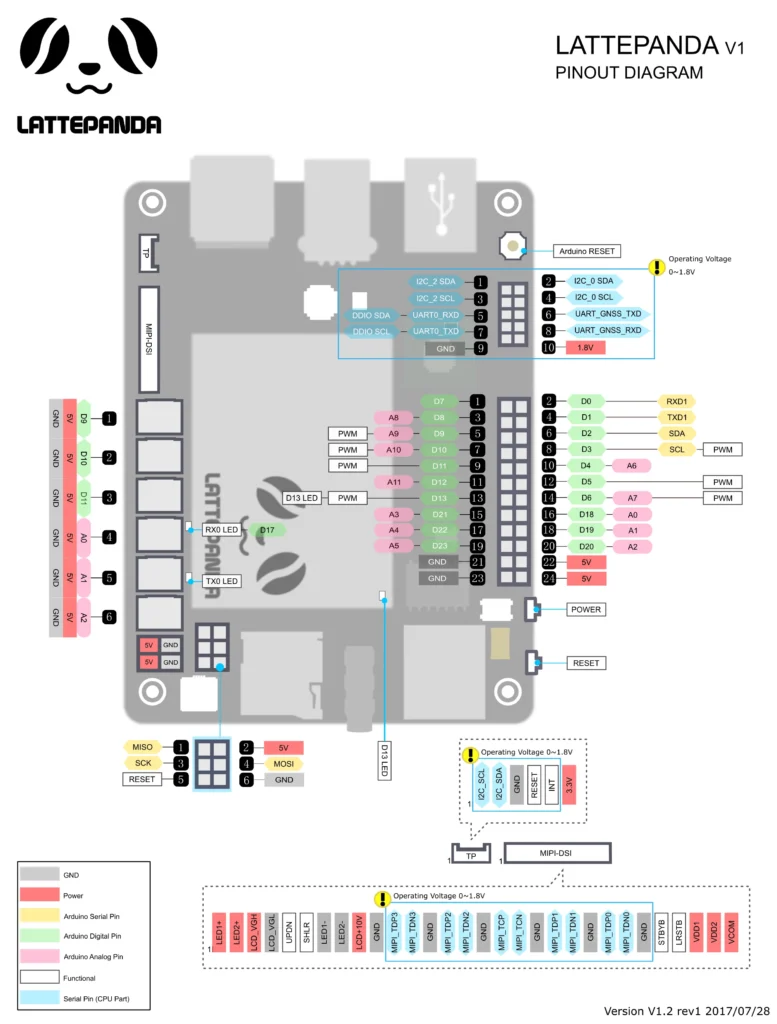
LattePanda V1 exposes Arduino-style headers connected to its onboard ATmega32u4, similar to an Arduino Leonardo. This means many Arduino shields and sensors can be used directly.
Key points about the GPIO:
- Based on ATmega32u4 (Arduino Leonardo compatible)
- Typical Arduino digital I/O pins (D0–D13)
- Analog inputs (A0–A5)
- PWM available on select pins
- UART, I²C, and SPI supported
- Operates at 5V logic (important when interfacing 3.3V devices)
The GPIO is handled by the microcontroller, not the Intel CPU, which helps with timing-sensitive tasks like reading sensors or generating PWM.
Pinout at a glance
Electrical characteristics (U2 / ATmega32u4 side):
- 20 digital pins (A0–A5, D0–D13) usable as input or output
- 5V logic level
- Up to 40 mA per I/O pin (absolute max)
- Internal pull-up resistors: 20–50 kΩ (disabled by default)
- Exceeding 40 mA per pin can permanently damage the MCU
Analog inputs
- A0–A11 (12 total analog inputs)
- A6–A11 mapped on D4, D6, D8, D9, D10, D12
- 10-bit ADC resolution (0–1023)
- Default measurement range: 0–5V
- All analog pins can also act as digital I/O
Special function pins
- Serial: D0 (RX), D1 (TX)
- External interrupts: D3, D2, D0, D1, D7
- PWM (8-bit): D3, D5, D6, D9, D10, D13
- SPI: D16 (MOSI), D14 (MISO), D15 (SCK)
- TWI/I²C: D2 (SDA), D3 (SCL)
- Built-in LED: D13
- Reset pin available for shields and external reset control
Specifications
| Feature | Details |
|---|---|
| Processor | Intel Atom x5-Z8300 quad-core |
| Architecture | x86 (64-bit capable) |
| Clock speed | Up to ~1.84 GHz |
| RAM | 2GB / 4GB DDR3L |
| Storage | 32GB / 64GB eMMC |
| Microcontroller | ATmega32u4 (Arduino compatible) |
| Graphics | Intel HD Graphics |
| Display output | HDMI |
| Connectivity | Wi-Fi, Bluetooth |
| USB | USB 2.0 ports |
| OS support | Windows 10 (full version) |
| Power input | 5V high-current supply recommended |
Compatibility
Software compatibility is one of LattePanda V1’s biggest strengths. Since it runs standard Windows, it supports:
- Desktop applications (C#, Python, Java, etc.)
- Visual Studio and .NET development
- PC-based automation and data logging tools
- Many legacy x86 programs that ARM boards cannot run
On the hardware side:
- Compatible with many Arduino libraries
- Works with common Arduino shields
- Supports typical sensors, displays, and modules used in maker projects
Important usage notes
- Not low-power friendly. Compared to ARM SBCs, it consumes more power and isn’t ideal for battery projects.
- Thermal considerations. Under heavy load, it can get warm; ventilation or a heatsink helps.
- Performance expectations. It’s closer to a low-end PC than a modern SBC; don’t expect Raspberry Pi 5–level performance.
- OS overhead. Windows consumes resources, so lightweight setups run smoother.
- Logic levels. Arduino side is 5V logic—use level shifting for 3.3V devices.
- Never exceed 40 mA per I/O pin on the ATmega32u4.
Helpful resources
1. Setup your LattePanda V1 correctly(video):
2. Hardware info: Official documentation
3. Read an in-depth review here