Arduino Uno R4 Minima and Arduino Uno R4 WiFi are development boards based on the Renesas RA4M1 ARM Cortex-M4 microcontroller running at 48 MHz. Both boards maintain the classic Arduino Uno R3 form factor and expose digital, analog, and communication interfaces through standard headers.
All GPIO operate at 5V logic levels, unlike many modern microcontroller boards.
Pinout
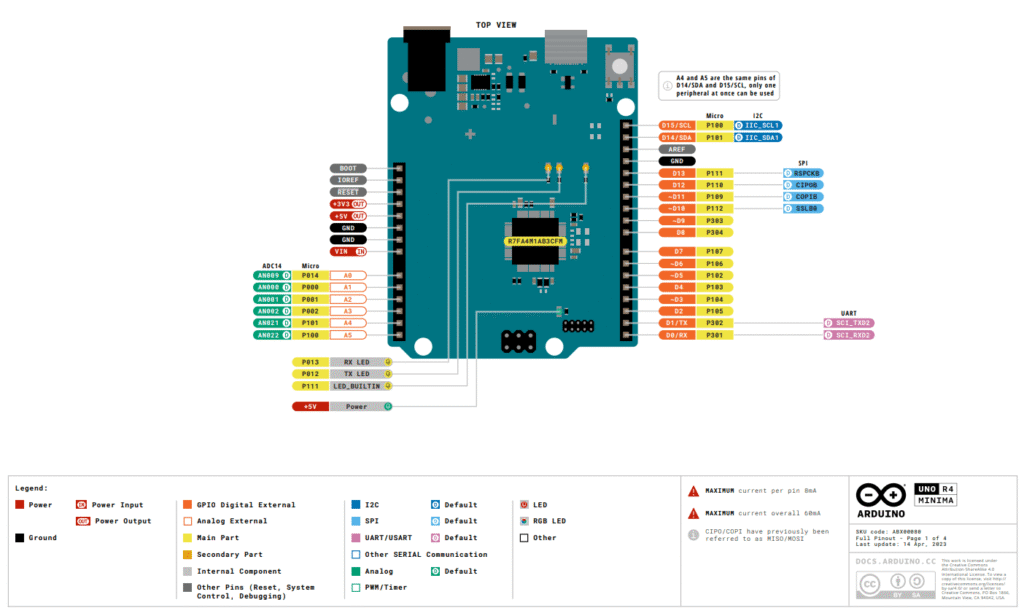
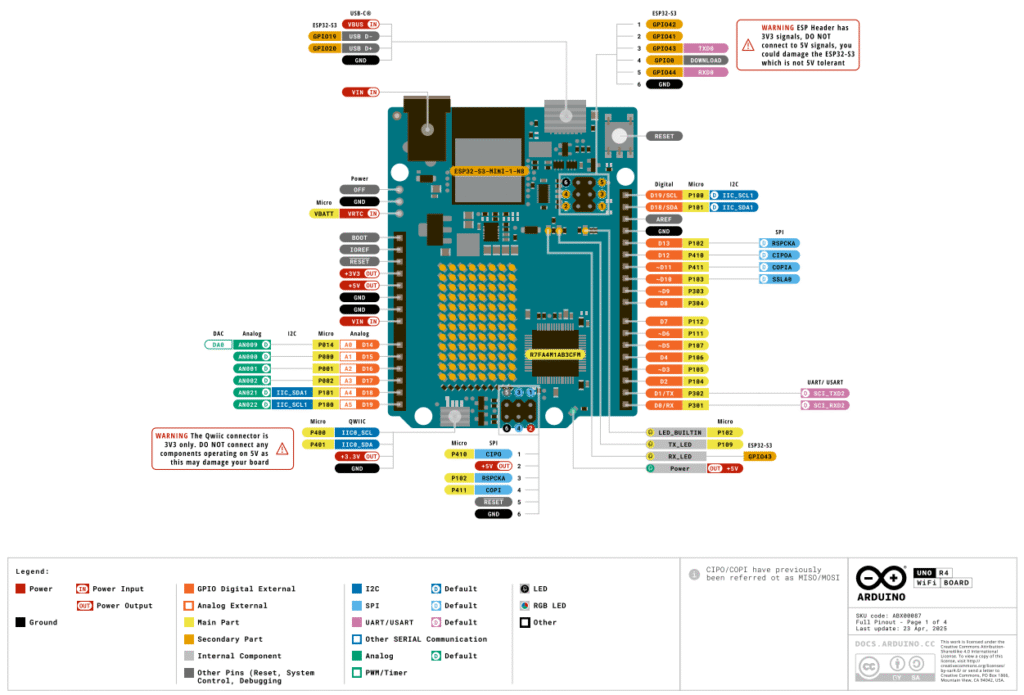
Pinout at a glance:
| Feature | Count |
|---|---|
| Digital I/O pins | 14 |
| PWM pins | 6 |
| Analog input pins | 6 |
| ADC resolution | 14-bit |
| DAC output | 1 |
| UART | 1 |
| I²C | 1 |
| SPI | 1 |
| 5V pins | Present |
| 3.3V pins | Present |
| Ground pins | Multiple |
Specifications
Given below are the specifications of UNO R4:
| Feature | Details |
|---|---|
| MCU | Renesas RA4M1 |
| Core | ARM Cortex-M4 |
| Clock speed | 48 MHz |
| Flash | 256 KB |
| SRAM | 32 KB |
| EEPROM | 8 KB (emulated) |
| Digital I/O | 14 |
| PWM pins | 6 |
| Analog inputs | 6 (14-bit ADC) |
| DAC | 1 × 12-bit |
| Logic level | 5V |
| USB | USB-C |
Additional (Uno R4 WiFi only)
| Feature | Details |
|---|---|
| Wi-Fi | ESP32-S3 module |
| Bluetooth | BLE |
| LED matrix | 12×8 onboard |
| VRTC & Off pins | No |
| Qwiic | Yes |
Important usage notes
- GPIO operate at 5V logic levels: be cautious when interfacing with 3.3V modules (level shifting may be required)
- Built-in HID Capability: Keyboard/Mouse emulation
- Analog inputs support 14-bit resolution
- True DAC output available on A0
- CAN Bus: The R4 has a built-in CAN controller. You will still need an external transceiver (like an MCP2551) to handle the physical signals, but the logic is now on board
- Because the R4 uses native USB, it occasionally “hangs” if your code crashes the processor. The Fix: quickly double-tap the Reset button. This forces the board into bootloader mode (you’ll see the “L” LED pulsing), allowing you to upload a fresh, clean sketch.
Helpful resources
1. Video tutorial series on UNO R4 WiFi:
2. Docs: R4 WiFi datasheet and R4 WiFi schematic
3. Docs: R4 Minima datasheet and schematic