ODROID-M2 is based on Rockchip RK3588S2 processor featuring an octa-core CPU (4× Cortex-A76 + 4× Cortex-A55) and a Mali-G610 GPU. It integrates a 6-TOPS NPU, LPDDR5 memory, and high-speed storage options.
The board provides 40-pin and 14-pin GPIO headers operating at 3.3V logic levels, supporting GPIO, UART, I²C, SPI, PWM, ADC, and analog audio.
Official GPIO Pinout
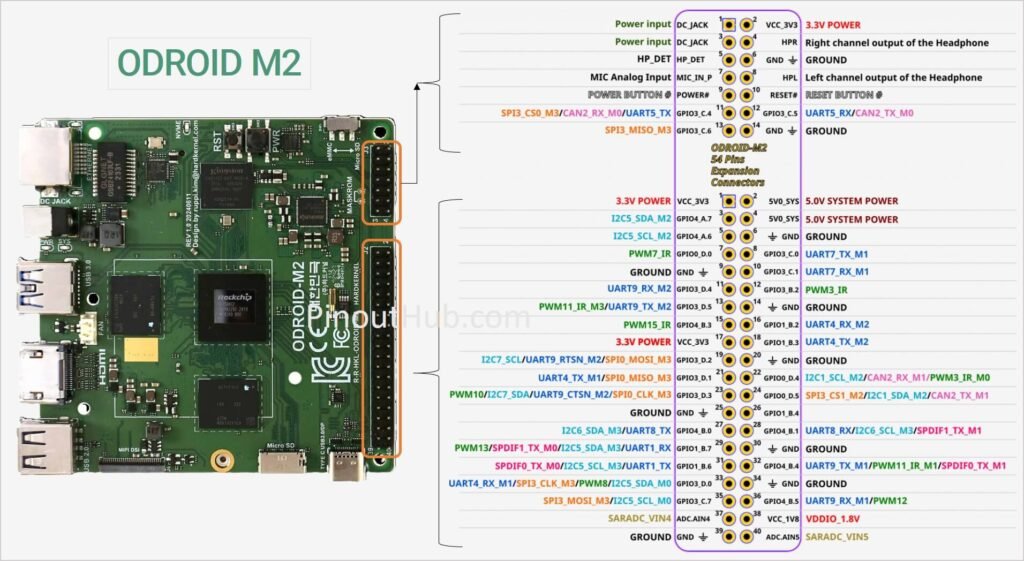
Specifications
| Feature | Details |
|---|---|
| SoC | Rockchip RK3588S2 |
| CPU | 4× Cortex-A76 @ ~2.3GHz + 4× Cortex-A55 @ ~1.8GHz |
| GPU | Mali-G610 MP4 |
| NPU | 6 TOPS RKNN |
| RAM | 8GB / 16GB LPDDR5 |
| Storage | 64GB eMMC + microSD + M.2 NVMe |
| Networking | Gigabit Ethernet |
| Video output | HDMI 2.0 (4K60 HDR), MIPI DSI, DP via USB-C |
| USB | USB 2.0 + USB 3.0 + USB-C (data/DP) |
| GPIO headers | 40-pin + 14-pin |
| Logic level | 3.3V |
| RTC | PCF8536 with CR2032 backup |
| Power input | 7.5–15.5V DC jack (12V/2A recommended) |
| Power usage | ~1W idle / ~7.5W load |
Compatibility
- 3.3V logic level
- Supports I²C, SPI, UART, PWM & ADC
- Dual GPIO headers (40-pin + 14-pin)
- DC barrel-jack powered
- Built-in RTC with battery backup
- Not Raspberry Pi HAT compatible
Software support
- Android 13 (AOSP)
- Ubuntu 20.04 / 24.04
- Kernel 5.10
- WiringPi library
- NPU APIs
- GStreamer/MPP for video
- Wayland GNOME desktop
Usage notes
- Many pins are multiplexed and configured via software/device tree
- The 14-pin header differs from ODROID-M1S (no USB 2.0 signals, different power rails)
- Some interfaces require enabling in the OS
- Use a stable 12V power supply for best performance
- GPIO headers are not Raspberry Pi compatible
Helpful resources
- Setting up the ODROID M2 for the first time
2. Official info: Odroid M2 benchmark.